
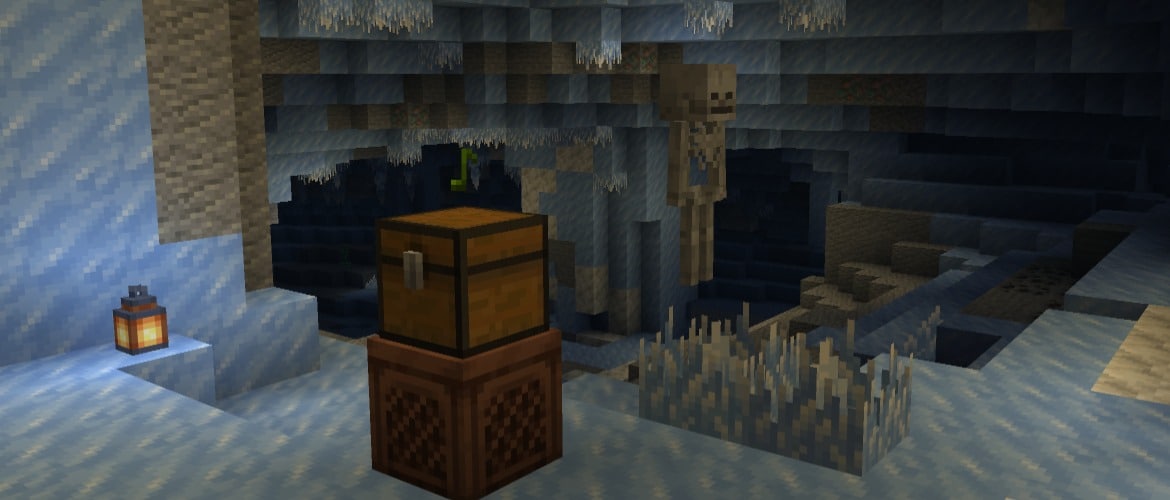

With 26.4 Snapshot 4, we're breaking out a cool new block, introducing Brittle Ice! And Jukeboxes can now keep the music going with playlists by putting your music discs in a chest above them, making dance parties much easier. Just be careful not to dance on the Brittle Ice, as it'll start cracking under your feet...
Happy Dance Break!
New Features
- Added Jukebox Playlists
- Added Brittle Ice
Jukebox Playlists
- Place a single Chest, Trapped Chest, or any Copper Chest variant directly above a Jukebox to use its Music Discs as a playlist
- Discs play in slot order, skipping empty slots and other non-music-disc items and looping back to the start
- When a disc finishes, the Jukebox swaps it with the next disc in the chest
- If the chest has no Music Discs, the disc in the Jukebox plays again
- Ejecting the current disc skips to the next available disc
Brittle Ice
- Brittle Ice is a new block that can be found in Ice Caves
- Once a player or mob steps on it, it will start to crack and eventually break
- The Frostbite mob can walk on Brittle Ice without breaking it
- Brittle Ice only generates naturally in Ice Caves as part of the crevasse feature
- It is obtainable with Silk Touch
- It can also be created by water flowing onto a Blue Ice block
- Any water block that borders the Blue Ice block horizontally will turn into Brittle Ice
Changes
Minor Tweaks to Blocks, Items and Entities
- Frosted Ice now emits a vibration event when changing state
- Ice, Frosted Ice, and Brittle Ice will no longer show their inside block faces when placed next to each other
- Zombies, Drowned, and Husks are now immune to freezing and will not take damage from the Freezing effect
- Drowned now turn into a Zombie before converting into a Frostbite when they are in Powder Snow
Sounds
- Added custom sounds for Ice, Packed Ice, Blue Ice and Frosted Ice blocks
- Renamed minecraft:amethyst block sound set to minecraft:amethyst_block to better match sound event names
Technical Changes
- The Data Pack version is now 124.0
- The Resource Pack version is now 100.1
Network Protocol
- The server now more consistently disconnects clients when a packet they sent causes an error
Data Pack Version 124.0
Sound events
- Removed sound events:
- minecraft:intentionally_empty
Sulfur Cube Archetypes
- Fields hit_sound and push_sound in sound_settings structure are now optional
Chicken Sound Variants
- Fields ambient_sound, hurt_sound, death_sound, step_sound in adult_sounds and baby_sounds structures are now optional
Cow Sound Variants
- Fields ambient_sound, hurt_sound, death_sound, step_sound are now optional
Cat Sound Variants
- Fields ambient_sound, stray_ambient_sound, hiss_sound, hurt_sound, death_sound, eat_sound, beg_for_food_sound, purr_sound, purreow_sound in adult_sounds and baby_sounds structures are now optional
Pig Sound Variants
- Fields ambient_sound, hurt_sound, death_sound, step_sound, eat_sound in adult_sounds and baby_sounds structures are now optional
Wolf Sound Variants
- Fields ambient_sound, hurt_sound, death_sound, step_sound, growl_sound, pant_sound, whine_sound in adult_sounds and baby_sounds structures are now optional
Fluid States
- Removed flowing_water and flowing_lava fluid types
- Fluid types now have the following properties
- level: Integer; same as before, the level of fluid from 1 to 8
- source: Boolean; true for source blocks, false otherwise
Predicates
Block Predicates
Updated matching_fluids
Added a state field to match state properties
Format:
- state: A map of name-value properties to be matched against the fluid state properties
- Value can be integer, boolean or string or object with optional min and max properties
Enchantments
Changed minecraft:explode Enchantment Effect
- Fields small_particle, large_particle and sound are now optional
World Generation
Features
Added crevasse Feature Type
Carves a winding, tapered crevasse into exposed terrain. The crevasse follows the terrain surface, extends in opposite directions from its placement position and requires a minimum connected footprint before carving.
- Format: object with fields:
- max_width - integer (between 2 and 8), maximum cross-section width in blocks
- max_length - integer (between 4 and 16), maximum end-to-end length in blocks
- min_footprint - integer (between 1 and 32), minimum connected horizontal footprint required before carving
- cursor_surface_search_range - positive integer, maximum amount of blocks the cursor will scan downwards to find its next position
- column_surface_search_range - positive integer, maximum amount of blocks each carving will scan downwards to find a carvable surface
- twistiness - float (between 0.0 and 16.0), amount of horizontal curvature
- tapering - float (between 0.0 and 1.0), amount of tapering applied on each step of growing the crevasse
- turn_factor - float (between 0.0 and 1.0), intensity of rotation applied on each step of growing the crevasse
- carve_depth - int provider, carve depth below the origin terrain surface
- fill_depth - int provider, fill depth below the origin terrain surface
- surface_block - Block state provider, block placed over the crevasse opening
- fill_block - Block state provider, block placed at or below the selected fill depth
- carvable_blocks - Block predicate, which blocks the crevasse is allowed to remove
- acceptable_barrier - Block predicate, which pre-existing blocks to accept as part of a barrier
Tags
Block Tags
- Added block tag #jukebox_containers to describe all blocks usable by a Jukebox as a source for music disc playlists
- Added block tag #face_occluding_ice_blocks to describe all ice blocks that should enable face culling when placed next to each other
Entity Type Tags
- Added the entity type tag #does_not_break_brittle_ice for mobs that do not break Brittle Ice blocks when stepping on them
Resource Pack Version 100.1
Block Sprites
-
Updated the following Block textures:
- block/jukebox_side.png
- block/jukebox_top.png
-
Added new Block textures:
- block/brittle_ice_0.png
- block/brittle_ice_1.png
- block/brittle_ice_2.png
- block/brittle_ice_3.png
- block/jukebox_bottom.png
Sounds
- Added new sound events:
- block.blue_ice.break
- block.blue_ice.fall
- block.blue_ice.hit
- block.blue_ice.place
- block.blue_ice.step
- block.brittle_ice.break
- block.brittle_ice.fall
- block.brittle_ice.hit
- block.brittle_ice.place
- block.brittle_ice.step
- block.brittle_ice.crack
- block.frosted_ice.break
- block.frosted_ice.fall
- block.frosted_ice.hit
- block.frosted_ice.place
- block.frosted_ice.step
- block.ice.ambient
- block.packed_ice.break
- block.packed_ice.fall
- block.packed_ice.hit
- block.packed_ice.place
- block.packed_ice.step
- entity.drowned.converted_to_zombie
Fixed bugs in 26.4 Snapshot 4
- MC-80827 - Mob statistics are missing space between the mob's name and the description
- MC-148455 - Dispensing an item with special behavior only plays the item's usage sound for certain cases
- MC-149032 - Clicking non-button areas of the stonecutter block selection GUI plays a clicking sound
- MC-163196 - Several blocks which can be placed on the sides of slime blocks cannot be placed on the sides of honey blocks
- MC-166792 - Attempting to navigate beyond the 100 page limit in a book and quill plays the page rustling sound
- MC-195474 - Can't move focus away from the "Done" button after pressing Tab to focus on it in the sign editing screen
- MC-207916 - Flint and steel and fire charges do not make a sound when igniting TNT
- MC-251040 - Several blocks which can be placed on top of slime blocks cannot be placed on top of honey blocks
- MC-251041 - Several blocks which can be placed on the bottom of slime blocks cannot be placed on the bottom of honey blocks
- MC-275975 - The "Unknown element name" codec error is missing a space
- MC-280455 - Items equippable on the saddle slot that have a custom equipping sound do not play the specified sound when saddling entities
- MC-280480 - The flint and steel clicking sound is not played when attempting to ignite TNT with a flint and steel when the tnt_explodes game rule is set to false
- MC-304895 - The overworld sky is no longer black in End biomes
- MC-305544 - Using the middle mouse button in Survival/Creative/Adventure mode and switching to Spectator mode opens the Spectator mode hotbar
- MC-307672 - The name_tag_distance attribute overrides the below_name_distance attribute
- MC-309335 - Any mouse button can be used to interact with entries in the world, server, and language selection screens
- MC-309336 - Any mouse button can be used to select and apply command autocomplete suggestions
- MC-310088 - The taskbar icon displays the Java logo instead of the game's logo
- MC-311312 - Endermen and entities eating chorus fruit can still pass through the world border
- MC-312200 - "Vegetation" is misspelled as "Vegitation" on the debug overlay
- MC-312201 - "Continents" is misspelled as "Contintents" on the debug overlay
- MC-312242 - Mushrooms cannot be placed on thin blocks that provide central support, unlike in Bedrock Edition
- MC-312256 - Breaking an armor stand in one hit does not trigger sculk shriekers
- MC-312273 - The placement sound is not played when a dispenser places an armor stand
- MC-312362 - Frostbites throwing ice balls shows and plays the "Drowned throws Trident" sound in closed captions
- MC-312367 - The closed caption for hurting a frostbite says "hurts" instead of "is hurt"
- MC-312378 - Ice caves are not part of the #is_cave biome tag
- MC-312379 - Gravel blobs no longer generate in biomes they previously did
- MC-312382 - Husks and zombies take damage from powder snow before converting, unlike skeletons
- MC-312383 - Frostbites convert to themselves while in powder snow
- MC-312385 - Drowned die in powder snow instead of converting to frostbites
- MC-312398 - Clicking on villagers with shears while they are holding out certain items causes the items to drop
- MC-312415 - The closed caption for husks converting to zombies in powder snow is incorrect
- MC-312456 - Mobs immune to freezing in powder snow can get the Freezing effect applied to them, unlike frostbites
Get the Snapshot
Snapshots are available for Minecraft: Java Edition. To install the Snapshot, open up the Minecraft Launcher and enable snapshots in the "Installations" tab.
Testing versions can corrupt your world, so please backup and/or run them in a different folder from your main worlds.
Cross-platform server jar:
Report bugs here:
Want to give feedback?
- For any feedback and suggestions, head over to the Feedback site. If you're feeling chatty, join us over at the official Minecraft Discord.
Dela denna story