
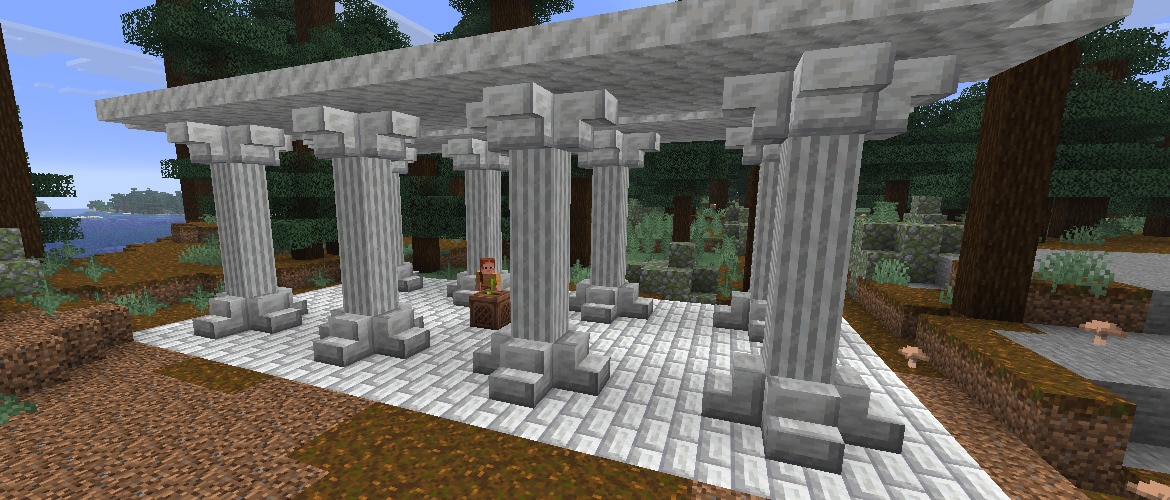

Minecraft 26.4 Snapshot 7 is here with a brand new music disc and a flurry of new blocks! These are the final gameplay features for the upcoming game drop, so grab your tools, turn up the music, and let's get to mining and crafting!
Happy building!
New Features
- Added Calcite Blockset
- Added a new Music Disc with the track "Flurry" by Hyper Potions
- Added a new decorative block to the game... somewhere
Calcite
- Added the Calcite Block Set
- Calcite now has a Pillar, Slab, Stair, and Wall variant
- Calcite Pillars, Slabs, Stairs, and Walls can also be crafted using a Stonecutter
- Added the Polished Calcite Block Set
- Polished Calcite can be crafted from 2x2 Calcite Blocks
- Polished Calcite, Slabs, Stairs, and Walls can also be crafted using a Stonecutter
- Added the Polished Calcite Bricks Block set
- Polished Calcite Bricks can be crafted from 2x2 Polished Calcite Blocks
- Polished Calcite Brick Slabs, Stairs, and Walls can also be crafted using a Stonecutter
- Calcite, Polished Calcite, and Polished Calcite Bricks belong to the Slow Bouncy Sulfur Cube archetype
Music and Sound
- Added a new music disc
- "Flurry" by Hyper Potions
- Has a chance of being found in Igloo basement Chests
- Has a comparator output of 7 when played in a Jukebox
Changes
- Updated the Main Menu background panorama
Minor Tweaks to Blocks, Items and Entities
- Being on fire now counters the Freezing Effect similar to wearing leather armor
- Wearing any piece of leather armor will prevent Zombies and Skeletons from converting into Frostbites or Strays
- Strays now spawn in the following biomes:
- Deep Frozen Ocean
- Frozen Ocean
- Frozen Peaks
- Frozen River
- Jagged Peaks
- Snowy Slopes
"Graphics API" Video Setting
- "Default" will now randomly pick either OpenGL or Vulkan on each startup
Developer's Note: As we've been defaulting to Vulkan for this snapshot series, we have had little testing on the OpenGL backend. After some recent big changes to our rendering code, we want to temporarily test both backends. This will be reverted in a future snapshot.
Realms
- The "Play" buttons in the Realms menus are now purple
UI
- Hovering entries in lists, such as friends or worlds, now outlines the entry in gray
- Navigating to edit boxes now differs between keyboard and arrow key navigation
- When using the Tab key, the edit box will be focused and editable
- When using arrow keys, the edit box will be highlighted but not editable, similar to slider buttons
- Pressing Enter or Space will make the box editable
- The mouse cursor is now hidden while navigating the UI with the keyboard, and reappears when the mouse is moved
- Added a tooltip to the recipe book button
Accessibility
- Gameplay screens, such as the Crafting Table, now support keyboard navigation and narration
Developer's Note: This is the first step towards making gameplay screens more accessible. As always, we'd love to hear your feedback, so please head on over to the feedback site.
Gameplay Screen Keyboard Navigation
- Gameplay screens can now be focused and used with the keyboard
- Tab moves between groups of slots, and the arrow keys move between slots within a group
- The Stonecutter recipes, Loom patterns, Enchanting Table options, and Villager and Wandering Trader trades are also navigated as a group
- The following interactions can be used on slots:
- Enter/Space behaves as a left-click
- Holding Control while pressing Enter/Space behaves like a right-click
- Holding Shift while pressing Enter/Space behaves like Shift-clicking
- Double-pressing Enter/Space collects matching items, like double-clicking
- Moving with the arrow keys while holding Enter/Space spreads the carried stack across slots, like holding left-click and dragging with the mouse
- The hotbar keys and the Drop item key act on the focused slot
- The Creative Inventory and the Recipe Book are not yet supported
Gameplay Screen Narration
- The narrator now reads out slots in gameplay screens
- Slots are narrated with their contents, item tooltip, and name for special slots such as armor, fuel, and potion slots
- The slot's position is narrated (e.g. "3 out of 9") in a group or as a column and row in a grid
- Stonecutter recipes and Loom patterns are narrated with their column and row, and trades and Enchanting Table options with their position in the list
- When a group is focused, the narrator mentions which arrow keys move within it
Technical Changes
- The Data Pack version is now 126.0
- The Resource Pack version is now 102.0
Data Pack Version 126.0
Commands
- The effect command now accepts mob effect tags
- Time arguments now fail if the provided value in ticks is greater than 2147483647
Debug Worlds
- Can now be modified as normal with block placement, breaking, and commands
- The blocks will no longer update automatically, you must create a new debug world to see new blocks
- Now include one of each entity type
- Entity types that can be babies will have a baby version included above the adult version
- Will now be tick-frozen on load
- Will now be created in "Normal" difficulty
- Will now have the following game rules set to false:
- advance_time
- advance_weather (this was already the case, listing here for completeness)
- spawn_wandering_traders
- tnt_explodes
Tags
- Removed unused #swimming and #flying Entity Type Tags
Block Sound Sets
- Removed unused minecraft:twisting_vines block sound set
Resource Pack Version 102.0
Block Sprites
- Renamed Block Textures:
- Renamed block/icicle_down_base.png to block/icicle_base.png
- Renamed block/icicle_down_frustum.png to block/icicle_frustum.png
- Renamed block/icicle_down_middle.png to block/icicle_middle.png
- Renamed block/icicle_down_tip.png to block/icicle_tip.png
- Renamed block/icicle_down_tip_merge.png to block/icicle_tip_merge.png
- Added new Block textures:
- block/calcite_pillar_side.png
- block/calcite_pillar_top.png
- block/polished_calcite.png
- block/polished_calcite_bricks.png
- block/polished_calcite_slab_side.png
Item Sprites
- Added new Item texture:
- item/music_disc_flurry.png
Sounds
- Added new sound event:
- entity.parrot.imitate.frostbite
Fixed bugs in 26.4 Snapshot 7
- MC-80859 - Starting to drag item stacks over other compatible stacks makes the latter invisible until their stack size increases
- MC-148140 - The scroll bar in the stonecutter UI appears 2 pixels too low when at the bottom of its rail
- MC-165610 - The scroll bar in the trading UI reaches the bottom too early
- MC-185630 - The bounding boxes of options in the enchanting table UI for clicking and hovering are inaccurate
- MC-235363 - Stonecutter recipe hitboxes are misaligned in height
- MC-264554 - The button highlights of focused trades in the trading UI move to other trades when scrolling
- MC-270272 - Any mouse button can be used to select options in the enchanting table UI
- MC-270555 - The outline of certain slots is obscured before the item is placed within the slot
- MC-280006 - Experience orbs floating around a player no longer fall to the ground when that player leaves the server
- MC-297502 - Any mouse button can be used to select options in the enchanting table, loom and stonecutter UIs
- MC-297624 - The stonecutter UI buttons are not keyboard-navigable, preventing the player from refilling the input by pressing Space
- MC-298546 - The loom UI buttons are not keyboard-navigable, preventing the player from refilling the inputs by pressing Space
- MC-298547 - The enchanting table UI buttons are not keyboard-navigable
- MC-302022 - Experience orbs desync after bouncing on lava
- MC-306817 - The scroll position in the trading UI is not synced to the visual scroll bar when there's a large amount of trades
- MC-306853 - /time does not throw errors when the values are too high
- MC-307422 - Changing the window size causes warnings in the game log
- MC-307991 - The game prefers to use the software GPU (llvmpipe) with the Vulkan rendering backend rather than the actual GPU with the OpenGL one when the GPU in use does not support Vulkan
- MC-309586 - The scroll position in the stonecutter UI resets when taking an item out of the result slot
- MC-311029 - The equipment entity predicate doesn't support the saddle slot
- MC-311520 - writeToTexture and copyBufferToTexture never check for GL errors, unlike the neighboring methods
- MC-311522 - The source buffer overrun check in FrontendCommandEncoder#writeToTexture uses integer arithmetic
- MC-311856 - Error when writing textures to the buffer with the OpenGL rendering backend
- MC-311883 - Mobs jitter and slide in crowds when they cannot reach the targeted player
- MC-311954 - The OpenGL rendering backend can't be used when running under XWayland
- MC-311974 - The new entity interpolation method introduced in 26.3 causes observable stutters compared to prior versions
- MC-312394 - Drowned with tridents have a significantly reduced attack range
- MC-312405 - The texture of frostbites contains unused pixels on the top left
- MC-312430 - Falling pointed blocks deal more damage than before
- MC-312491 - Parrots don't imitate frostbites
- MC-312637 - Sculk sensors aren't activated upon ice melting in the Nether
- MC-312653 - The below_name score is displayed above entities whose name tag is hidden
- MC-312658 - Ores inside tuff blobs at heights 0-3 no longer generate as their deepslate variant
- MC-312667 - The tooltips of the items in the statistics menu don't appear when they are focused with the keyboard
- MC-312672 - The narrator reads villager trade offers as "button" without providing any context
- MC-312733 - Snow golem attack range is significantly reduced
- MC-312768 - Any mouse button can be used to drag the scroll bars of the stonecutter, loom, and villager trading menus
- MC-312779 - Heads and blocks worn by small armor stands are stretched
- MC-312781 - Witches, withers, and llamas no longer attack targets outside of their attack radius
- MC-312785 - Any mouse button can be used to select entries in the "Experimental Feature Requirements" screen
- MC-312803 - Lightning removes the wax from a waxed copper golem, unlike waxed copper blocks
- MC-312823 - Any mouse button can be used to select entries in the "Add Realm" screen
- MC-312824 - Any mouse button can be used to select entries in the "Changes From Last Backup" screen
- MC-312837 - The twisting_vines block sound set is unused
- MC-312845 - Item frames and glow item frames can be placed outside of the world border by placing them against blocks within the world border, unlike paintings
- MC-312864 - Semi-transparent text renders darker when the "Improved Transparency" option is enabled
- MC-312866 - Any mouse button can be used to open the "Terms of Service" link on the "Realms Terms of Service" screen
- MC-312893 - Horses' gallopSoundCounter is not reset properly
- MC-312909 - The campsite_pale_garden_2 abandoned camp structure never generates
- MC-312912 - The giant trees in the campsite_old_growth_pine_taiga_1, campsite_old_growth_spruce_taiga_4, and campsite_snowy_taiga_3 abandoned camp structures never generate
- MC-312913 - The trees in several abandoned camp tents don't generate
- MC-312942 - The sound previews of volume sliders cannot be heard when the "UI" volume slider is turned off
- MC-312962 - The Vulkan rendering backend leaks native memory on every render pass
Get the Snapshot
Snapshots are available for Minecraft: Java Edition. To install the Snapshot, open up the Minecraft Launcher and enable snapshots in the "Installations" tab.
Testing versions can corrupt your world, so please backup and/or run them in a different folder from your main worlds.
Cross-platform server jar:
Report bugs here:
Want to give feedback?
- For any feedback and suggestions, head over to the Feedback site. If you're feeling chatty, join us over at the official Minecraft Discord.
Disen beitrag teilen