
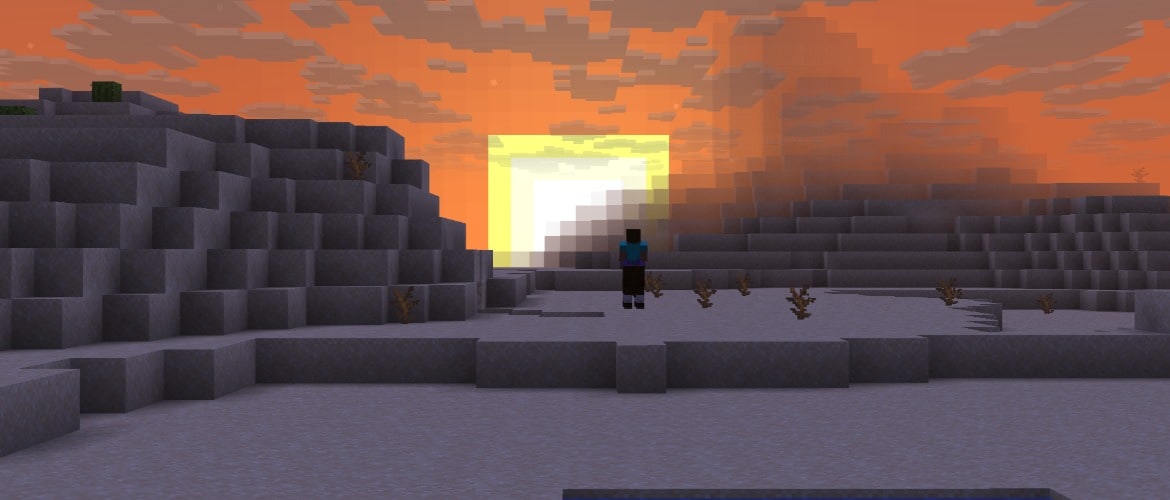

Hi there! It is time for the second snapshot for 26.4, featuring improved render distance fog, a new celestial occluder, and a fresh redesign of the F3 screen.
Happy mining!
Changes
- When "Improved Transparency" is on, sky background and clouds that are behind the terrain are now blended into the terrain render distance fog making the boundary between the sky and the terrain invisible
- In the Overworld, the bottom half of the skybox is now occluding the celestial objects such as the sun, the moon and the stars
UI
- The debug overlay (F3 by default) has been redesigned to be easier to read and understand
Technical Changes
- The Data Pack version is now 122.1
- The Resource Pack version is now 99.0
Data Pack Version 122.1
New Environment Attributes
minecraft:visual/has_sky_occluder
Determines whether the sky occluder is enabled for the environment. The sky occluder will occlude the sky box up until a certain angle with fog color with a smooth occlusion border.
- Value type: boolean
- Default value: true for the Overworld, false for the Nether and the End
- Interpolated: no
Predicates
Added below_heightmap:
Checks if the height of the position is below a given heightmap value.
Format:
- heightmap: Heightmap type to compare origin against
Resource Pack Version 99.0
Shaders & Post-process Effects
- screenquad.vsh was renamed to screentriangle.vsh since it was actually representing a single triangle for a while now
Changes for the "Improved Fog" feature that is controlled by the "Improved Transparency" video setting
- Removed OIT (Order-Independent Transparency, controlled by "Improved Transparency" video setting) support from the clouds.fsh, since it is now used to render clouds when OIT is off and to render clouds to an offscreen target when OIT is on
- Added blit_clouds.fsh shader with OIT support that renders clouds from an offscreen target to OIT targets
New Shaders for the Sky Occlusion
- Added sky_occluder.vsh and sky_occluder.fsh shaders which are used to occlude the sky box up until the certain angle with fog color with a smooth occlusion border
Fixed bugs in 26.4 Snapshot 2
- MC-152504 - The sky overlaps fog underwater, notably at sunrise and sunset
- MC-184161 - The "Oh Shiny" advancement title is missing a comma
- MC-195836 - Some closed captions aren't in the correct tense or are formatted incorrectly
- MC-212623 - Some closed captions use the word "angers" as a verb, therefore making them grammatically incorrect
- MC-236052 - Z-fighting can be seen around the necks of small armor stands
- MC-264274 - Placing lily pads and frogspawn does not increment their used:[block] statistics
- MC-300250 - Clouds render behind foggy terrain
- MC-300894 - The harness layer is not scaled correctly on baby happy ghasts
- MC-310503 - LivingEntity's constructor randomizes the yaw in radians instead of degrees
- MC-311424 - The Right Shift key is recognized as key.keyboard.unknown ("Not Bound") with certain input methods
- MC-311451 - Mouse input is not recognized on monitors that are in negative positions on Wayland
- MC-311458 - The "Adventure" advancement's icon is inconsistent with the Adventure game mode's icon in the game mode switcher
- MC-311758 - Block breaking particles and sounds are not canceled and continue appearing when opening the game mode switcher
- MC-311777 - Block breaking particles and sounds are not canceled and continue appearing when instantly mining a block and swapping the item into the off hand simultaneously
- MC-311780 - Trigonometric functions don't wrap angles before being applied and aren't fully periodic
- MC-311781 - The game is not minimized when losing focus in fullscreen mode
- MC-311826 - On some systems, tabbing in and out of the game in fullscreen mode while the "Toggle Cinematic Camera" key bind is unbound will toggle it
- MC-311924 - Breaking an armor stand or block-attached entity near a sculk catalyst consumes the player's experience
- MC-311933 - The horizontal scroll direction is inverted in the Advancements screen
- MC-311949 - The "Not Bound" scancode can activate key binds
- MC-311965 - The commands.posteffect.list.success string always pluralizes the word "effects"
- MC-311969 - Some strings that mention specified slots are missing articles
- MC-311970 - The options.debugGuiScale.tooltip string lacks a period, unlike similar strings
- MC-311971 - Some strings refer to the "LAN" setting as the "multiplayer scope" and write its value as "Off" instead of "OFF"
- MC-311973 - The options.worldOptions.guest.command_access.tooltip string redundantly includes "or not"
- MC-311977 - The closed caption for riding zombie nautiluses is "Nautilus bubbles"
- MC-311978 - Some argument error strings introduce the invalid value with a colon instead of surrounding it with single quotes, unlike similar strings
- MC-311997 - The options.macFullscreenMenuVisibility.tooltip string is improperly capitalized
- MC-311999 - The options.ctrlClickEmulatesRightClick string is missing a hyphen between the words "Right" and "Click"
- MC-312035 - Attacking an entity in Creative mode, then switching to Survival mode adds 5 ticks of block break delay
- MC-312046 - Mushrooms now generate in excessive quantities in swamps
- MC-312064 - The game can randomly crash during chunk generation
- MC-312065 - Some test coordinate strings are displayed with two sets of square brackets, unlike similar strings
- MC-312066 - Donkeys, horses and mules in water can no longer be ridden onto land without the aid of a partial block
- MC-312068 - Some strings are missing articles before the word "invalid"
- MC-312075 - The options.directionalAudio.off.tooltip string is improperly capitalized, unlike similar strings
- MC-312078 - The options.hideMatchedNames.tooltip string is improperly capitalized, unlike similar strings
- MC-312079 - The options.fullscreen.unavailable string is improperly capitalized, unlike similar strings
- MC-312080 - The telemetry.event.world_loaded.description string is improperly capitalized, unlike similar strings
- MC-312082 - The advancements.husbandry.uh_oh.title string is missing a hyphen between the words "Uh" and "Oh"
- MC-312084 - The options.fullscreen.entry string is missing a hyphen before the word "bit"
- MC-312087 - The word "towards" within the options.vignette.tooltip string isn't spelled in American English
- MC-312088 - Some application control key name strings are displayed without the "AC" prefix, unlike similar strings
- MC-312089 - Some strings that name screens are improperly capitalized, unlike similar strings
- MC-312091 - The chat.copy.click string is improperly capitalized, unlike similar strings
- MC-312092 - The multiplayer.socialInteractions.not_available string is improperly capitalized, unlike similar strings
- MC-312102 - The disconnect.loginFailedInfo.invalidSession string is improperly capitalized, unlike similar strings
- MC-312103 - The entity name "Experience Orbs" isn't capitalized within some game rule description strings, unlike similar strings
- MC-312107 - The selectWorld.backupQuestion.experimental string is improperly capitalized, unlike similar strings
- MC-312108 - The jigsaw_block.final_state string is improperly capitalized, unlike similar strings
- MC-312111 - Some Realms snapshot popup strings are improperly capitalized, unlike similar strings
- MC-312112 - The mco.configure.world.invite_codes.subtitle string uses the verb "add" instead of "create", unlike similar strings
- MC-312126 - The options.inGameNotification.tooltip string is improperly capitalized, unlike similar strings
Get the Snapshot
Snapshots are available for Minecraft: Java Edition. To install the Snapshot, open up the Minecraft Launcher and enable snapshots in the "Installations" tab.
Testing versions can corrupt your world, so please backup and/or run them in a different folder from your main worlds.
Cross-platform server jar:
Report bugs here:
Want to give feedback?
- For any feedback and suggestions, head over to the Feedback site. If you're feeling chatty, join us over at the official Minecraft Discord.
分享这个故事