
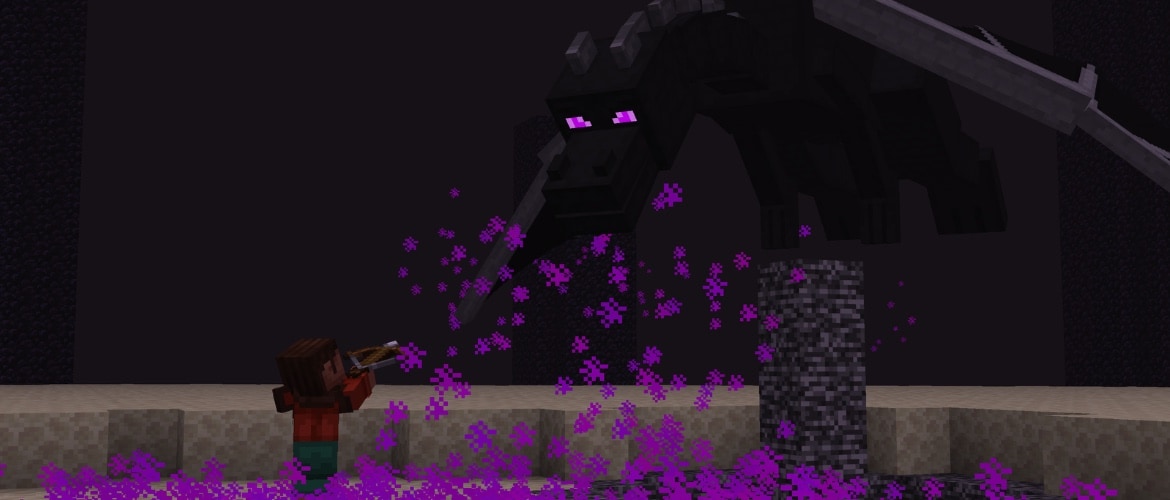

Well, it seems like our Ender Dragon has forgotten a thing or two about flying! In 26.4 Snapshot 8, we've fixed several issues with the dragon's flight behavior to help get it back on track. We've also added language support for two new languages, alongside a handful of smaller tweaks.
Happy Dragon Fighting!
New Features
- Added Javanese and Chavacano, Zamboanga language support to the game
Changes
- Fixed some issues with the Ender Dragon battle that caused the dragon to not move properly
Minor Tweaks to Blocks, Items and Entities
- Added Snow Layers and Snow Blocks next to the Snow Brick Set in the Creative Inventory
- All undead mobs will now be immune to the Freezing effect
- The damage dealt by the Ice Ball has been reduced
- The Cold Sulfur Cube archetype will no longer float to match the behavior of other archetypes of similar properties
Technical Changes
- The Data Pack version is now 127.0
- The Resource Pack version is now 103.0
- Terrain vertex data in terrain.vsh is now fetched from a texel buffer instead of traditional vertex buffers
- The packing of vertex data for terrain chunk section mesh data has been changed
Network Protocol
- The entity position synchronization packet now includes full-precision head rotation
Data Pack Versions 127.0
Validation
- Most validation issues in following registries no longer prevent elements from being loaded:
- minecraft:loot_table
- minecraft:predicate
- minecraft:item_modifier
- minecraft:slot_source
- minecraft:context_float_provider
- minecraft:context_int_provider
- minecraft:villager_trade
- trigger fields in minecraft:advancement
- requirements fields on minecraft:enchantment_effect_component_type instances
- The following issues are now considered errors that can prevent pack loading or cause command compilation failure:
- The validated element makes recursive calls to itself, either through tags or namespaced IDs
- Any context values required by the validated element are missing from the context provided during execution
- For example, the modifier type minecraft:apply_bonus (which uses the tool context value) cannot be used in an item ... modify command which provides the minecraft:command_modifier context (which lacks the tool context value)
- Elements will only be validated if they don't have conditions or condition has all required context values
- That means conditional elements can be used to avoid validation errors in loot elements used in multiple context
- Conditional elements:
- condition field for cases in minecraft:number_dispatcher (both minecraft:context_float_provider and minecraft:context_int_provider kinds)
- merchant_predicate condition field in minecraft:villager_trade
- condition field in loot pools, loot pool entries and loot functions
- Validation errors will now prevent command compilation, both in functions and from the console
- For example, compute entity @s float {type: "minecraft:enchantment_level",amount:{type:"minecraft:linear",base:0.15,per_level_above_first:0.15}} will now fail to compile due to use of minecraft:enchantment_level in a minecraft:command_compute_entity context that does not provide required information (minecraft:enchantment_level)
- The minecraft:command context has been split into minecraft:command_predicate (used for predicates in commands, like /execute if predicate) and minecraft:command_modifier (used for item modifiers, for example in /item ... modify functions)
- To simplify the discovery of validation rules, a new report has been added: loot_context_requirements.json
- Values given as allowed for some context can be used by validated elements when run in this context
- The context used by command arguments can be found in the commands.json report in the context field of the following argument types:
- minecraft:context_float_provider
- minecraft:context_int_provider
- minecraft:loot_modifier
- minecraft:loot_predicate
- minecraft:loot_table
- minecraft:slot_source
Commands
- The command report format has been changed:
- Argument information is now under the field argument instead of being merged into the parent node
- Information about suggestions is now available
Added pattern argument
- Added command argument type for matching regular expression patterns
- This argument was added to improve support for commands added by server-side mods and plugins
Tags
Block Tags
- Added #triggers_ambient_ice_block_sounds - all blocks that trigger Ice to play its ambient sound
- Added #triggers_ambient_ice_crystal_sounds - all blocks that trigger Ice Crystals to play their ambient sound
Resource Pack Versions 103.0
UI Sprites
- Added a new UI texture:
- friends/tab_focused.png
Sounds
- Added new sound events:
- entity.frostbite.throw
Shaders & Post-process Effects
- terrain.vsh is refactored to decode new vertex data packing
Order-Independent Transparency shaders
- OIT shaders were converted to rely on subpasses
- Changed core/oit_composite.fsh, core/oit_depth_bounds_cull.fsh, include/oit_depth_sample.glsl, include/oit_sample.glsl
- Added core/blit_depth_bounds.fsh shader to blit depth bounds in a subpass context
Boat Water Mask Shaders
- The way water mask is handled was changed to support subpasses in OIT
- It is now rendered to a separate target that is sampled during terrain rendering instead of being rendered to the terrain depth buffer
- Changed core/rendertype_water_mask.fsh and core/terrain.fsh
- Removed core/blit_depth.fsh
- This approach is used both when OIT is on and off
Fixed bugs in 26.4 Snapshot 8
- MC-164558 - Mobs ridden by players very rarely receive vertical knockback when attacked
- MC-197201 - Ender dragons no longer dive toward the player
- MC-271336 - Ender dragons dive to the exit portal incorrectly
- MC-271337 - Ender dragons frequently get stuck flying back and forth between two points
- MC-272431 - The vertical velocity of ender dragons when flying is incorrect, causing erratic behavior
- MC-276058 - The motion of some rideable entities stops when getting launched from wind charges
- MC-311382 - The "Free trial" and "Try for free" buttons do not use high contrast button textures when the "High Contrast" resource pack is enabled
- MC-311422 - The gui/realms/minigames.png texture contains a redstone torch with its old texture
- MC-312077 - Some Realms progress screen strings are improperly capitalized, unlike similar strings
- MC-312364 - The freezing particle has incorrect rotation interpolation for the first tick
- MC-312399 - Entity textures are not reloaded without relaunching the game
- MC-312425 - Removed data component types present in the hidden_components field of a tooltip_display component log a deserialization warning
- MC-312586 - Tabs in the friends and other players menus don't render with a white outline when open and selected
- MC-312591 - Players who aren't friends are narrated as friends when hovering over them in the other players menu
- MC-312674 - The search boxes in the language, resource pack, data pack, game rule, and single biome screens are narrated without a name
- MC-312762 - The closed caption for frostbites throwing ice balls is inconsistent with other mobs that throw projectiles
- MC-312796 - The third person camera can display the suffocation overlay when angling your camera in specific ways against blocks
- MC-312806 - The narrator doesn't read the title or message on the confirmation screen for uninviting players from Realms
- MC-312833 - Growing trees next to logs that aren't part of them causes their leaves to decay
- MC-312858 - The block.ice.ambient sound event is controlled by the "Blocks" sound category instead of "Ambient/Environment"
- MC-312878 - The sound played when throwing ice balls is pitched incorrectly when thrown by frostbites
- MC-312944 - When the player swims on the water surface, the water fog is rendered incorrectly
- MC-312952 - The game crashes when generating canyons when the noise settings' min_y field is set to a greater value than the dimension's min_y field
- MC-312955 - GUI textures are not reloaded without relaunching the game
- MC-312960 - The snow block isn't grouped alongside snow bricks in the "Building Blocks" tab in the Creative mode inventory
- MC-312972 - Skeletons can still receive the Freezing effect
- MC-312981 - Sulfur cubes with the cold archetype can create frosted ice on flowing water
- MC-312990 - The bedrock ceiling is exposed in some ravines in the Nether
- MC-313046 - Item tooltips in inventories now appear too low or too high
- MC-313052 - The game crashes when pressing an arrow key after pressing a mouse button other than left-click over an entry in the items tab of the statistics menu
- MC-313053 - Failed /effect commands report applying zero effects instead of specifying the appropriate value
- MC-313055 - The last column of entities in Debug Mode worlds is duplicated
- MC-313057 - The "Bounce" and "flurry" music discs have unused, un-deprecated music disc description translation keys
- MC-313060 - The name of the "flurry" music disc is capitalized inconsistently
- MC-313065 - The outer edges of inventory slots are no longer selectable
- MC-313071 - The mouse cursor flickers while moving it on the screen and holding Enter/Space at the same time
- MC-313079 - The "FOV Effects" option doesn't affect the death screen zoom
- MC-313080 - The "Other Players" tutorial toast ignores the "Notification Time" setting
- MC-313081 - Typing in the search box of the language menu deselects the selected language
- MC-313087 - The eyebrows of breezes are no longer emissive
- MC-313088 - Taking an item from an anvil using keyboard navigation incorrectly focuses the text box
- MC-313091 - Minecarts no longer take fall damage with the "Minecart Improvements" experiment disabled
- MC-313103 - The additional vertical gap applied under item names in their tooltips is misplaced when the item name wraps
Get the Snapshot
Snapshots are available for Minecraft: Java Edition. To install the Snapshot, open up the Minecraft Launcher and enable snapshots in the "Installations" tab.
Testing versions can corrupt your world, so please backup and/or run them in a different folder from your main worlds.
Cross-platform server jar:
Report bugs here:
Want to give feedback?
- For any feedback and suggestions, head over to the Feedback site. If you're feeling chatty, join us over at the official Minecraft Discord.
이 이야기 공유하기