
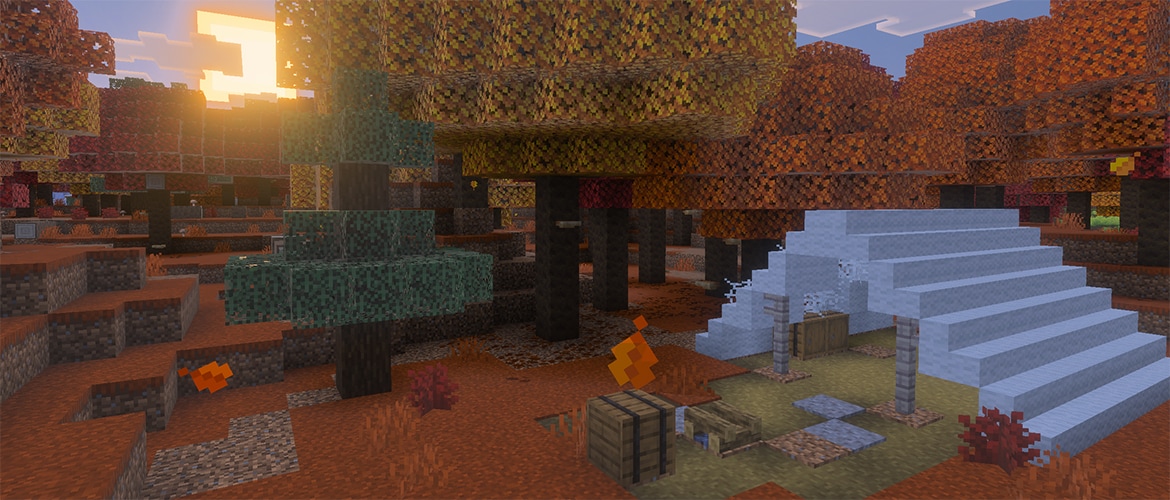

Word around the campfire is the new forest biome is out in testing! But if nobody’s been to the dappled forest before, who built the abandoned camp? And what loot did they leave among the poplar trees and red shrubs? Scout out the place and set up shelter using the new wood set and other features from our next game drop. The expedition into wilderness starts now in testing!
For the full list of goodies, browse the changelog below. And as always, we’re keen to get your feedback on these new features at feedback.minecraft.net, and you can report any bugs you find at bugs.mojang.com.
Drop 3 Experimental Features
Abandoned Camp
The Abandoned Camp structure is a new kind of structure which can be found in the following biomes:
- Meadow
- Cherry Grove
- Forest
- Birch Forest
- Old Growth Birch Forest
- Flower Forest
- Windswept Forest
- Dappled Forest
- Taiga
- Snowy Taiga
- Old Growth Spruce Taiga
- Old Growth Pine Taiga
- Sparse Jungle
- Bamboo Jungle
- Swamp
- Savanna
- Wooded Badlands
- Pale Garden
Each of these biomes has its own variant of the structure with design based on that biome
Certain structure pieces are generic for all biome variants of the structure
Various Chests and Barrels with loot can be found at Abandoned Camps
Dappled Forest
The Dappled Forest is a new type of forest biome which can be found near cold biomes
Poplar Trees and fallen Poplar Trees generate here
Shelf Mushrooms can be found here, placed on Poplar Trees and fallen Poplar Trees
Red Shrubs generate here
The following passive and neutral mobs spawn in the Dappled Forest, using their cold variants where applicable:
- Sheep
- Chicken
- Cow
- Pig
- Rabbit
- Fox
A Dappled Forest variant of the new Abandoned Camp structure can be found here
Poplar Trees
Added the Poplar Tree to the game
- A new type of tree in the Dappled Forest which comes in three color variations:
- Red Poplar Leaves
- Orange Poplar Leaves
- Yellow Poplar Leaves
Each variant of the tree has its own variant of falling leaf particles matching the color of the leaves
Poplar Leaves drop Poplar Saplings which will randomly grow into any of the three different variants
Poplar Saplings can be found in trades with Wandering Trader
Shelf Mushrooms and Leaf Litter naturally generates on and around Poplar Trees
The trunk of the trees are made of Poplar Logs
Poplar Logs can be crafted into a new set of Poplar wood blocks
- Forest ambience sounds are tied to the Poplar Leaf blocks
- Known issue: Some Vibrant Visuals settings are currently not being applied correctly to Poplar Leaf blocks
Red Shrub
- Red Shrub is a new type of decorative plant block that can be found in small patches in the Dappled Forest
- Can be used in the Composter
- Using Bone Meal on a Red Shrub grows a Red Shrub in a random adjacent space if possible
Shelf Mushroom
- A new type of mushroom that generates on Poplar Trees and fallen Poplar Trees
- Can be found in two sizes, small and large
- A small Shelf Mushroom can be grown into a large Shelf Mushroom using Bone Meal
- A large Shelf Mushroom drops two Shelf Mushroom items when broken
- Can be used like other mushrooms to make Stews
- Can be found in trades with Wandering Trader
- Shelf Mushroom has a slight bounciness when stepped on, similar to Beds
Blocks
Added Wool Stair blocks and Wool Slab blocks of the following colors:
- Black
- Blue
- Brown
- Cyan
- Gray
- Green
- Light Blue
- Light Gray
- Lime
- Magenta
- Orange
- Pink
- Purple
- Red
- White
- Yellow
Features and Bug Fixes
Accessibility
- The screen no longer jitters when the Screen Distortion accessibility setting is changed (MCPE-239556)
Graphical
- Frame pacing is now available in Preview on Xbox platforms. Frame pacing is disabled by default and can be enabled in Video settings
Stability and Performance
- Fixed an issue where the game would crash when opening the game from an invite notification on Android.
Blocks
Sulfur and Cinnabar Stairs no longer prevent Chests from opening (MCPE-239689)
Fixed issue where air would not be replenished by air bubbles (MCPE-239551)
Gameplay
- Fixed arm animation triggering when no block is affected
Graphical
Fixed clouds rendering in front of transparent blocks such as Glass when Vibrant Visuals is enabled
Fixed an issue where colored light-emitting blocks no longer emitted light in worlds using the official RTX texture pack. (MCPE-218532)
Atlas composited textures for blocks now render correctly ((MCPE-223126)
Items
Arrow damage now scales with velocity instead of being fully randomized (MCPE-161077)
All arrows fired by mobs using a Crossbow now share the same damage behavior, regardless of the firing mob
- Previously, arrows shot by Piglins were treated as if they were fired from a Bow
Only arrows fired by mobs using a Bow (e.g. Skeletons and their variants) scale their damage with world difficulty
- Arrows fired by Players or other mobs are no longer affected by difficulty
The screen no longer flickers when drinking a Milk Bucket while the Nausea effect is active (MCPE-239698)
Mobs
Blocks absorbed by a Sulfur Cube are now rendered with the same facing direction as in Java Edition (MCPE-238269)
High levels of the Strength effect now correctly increase the distance at which a Sulfur Cube with an absorbed block is knocked back
Sulfur Cubes carrying an absorbed block now emit landing particles when they hit the ground (MCPE-239318)
Players can no longer get soft-locked when standing inside a Sulfur Cube's or a Creaking's bounding box, as they are now able to interact with the entities and blocks around them through the mob
- Applies only when the entities are invulnerable (i.e., Sulfur Cube has a block absorbed, or Creaking has been spawned by a Creaking Heart)
- Replaces the workaround where Creakings would despawn after blocking a player for too long
Fixed issue where sheep do not eat grass after being sheared (MCPE-239548)
Realms
Fixed an issue where content obtained from Marketplace while editing your Realm would not immediately appear in available items
Fixed an issue where downloading a world from the realms hub slot screen vs. the realms edit world screens would result in different names
-Prevent owners from modifying admin's gameplay permissions
Added a Delete button on the Subscriptions tab for expired Realms
Updated terms on Realms purchase screen
Stability and Performance
- Fixed a crash that could occur when backing out of an NPC's Advanced Settings (MCPE-239589)
Storage
Preview only: Updated old and retail world conversion flows in the Storage Settings tab.
Adding a specific error modal when upload to cloud fails due to full cloud storage (MCPE-239104)
User Interface
New social/friends drawer infrastructure with performance fixes.
Don't hide the tooltips option when any behavior pack is downloaded (MCPE-184669)
Improved performance when scrolling the Crafting Recipe Book , (MCPE-231750) (MCPE-235811)
Fixed a softlock where cancelling a resource pack download during a server transfer would leave the player stuck on the "Connecting to Server" modal
Fixed rare crash that occurred when interacting with items in the UI
Fixed flickering crosshair in split screen , (MCPE-123918)
Fixed Banner message for graphics mode settings option (MCPE-231879)
Fixed Fullscreen mode to remember which screen it was last on.
Fixed 'Remove' button not eliminating blocks from Creative inventory in Pocket UI
Technical Updates
Commands
- Allow using player name as target for commands (i.e. /tell) for non-operator players.
AI Components
Made schemas for the following components stricter when parsing and will fail to load an entity json that has invalid data in versions 1.26.40 and newer.
- minecraft:jump.dynamic
- minecraft:jump.static
API
Renamed Dimension.findClosestBiome to Dimension.calculateClosestBiomeFromSeed and released from beta to scripts version 2.9.0
Released BiomeSearchOptions from beta to scripts version 2.9.0
DDUI
- Added image method onto CustomForm in @minecraft/server-ui to allow showing images on CustomForms.
Block Components
- Vanilla blocks defined with shapes in the shapes/ folder now use voxel-shape based culling without requiring the Voxel Shapes experiment. This will allow custom blocks using voxel-shapes to attempt to cull against any vanilla block with a voxel-shape
Fences
- In 1.26.40+ worlds, fence connection changes now send server-side block updates to adjacent blocks. Older worlds keep legacy behavior for compatibility.
Stairs
Vanilla stair blocks now expose a minecraft:corner block state (none, inner_left, inner_right, outer_left, outer_right) reflecting the corner shape formed with adjacent stairs
For new worlds (base game version 1.26.40 and later), stair corner-state changes now trigger neighbor block updates for parity with Java Edition; existing worlds keep the prior client-only update behavior
Dedicated Server
- Added CLI options to run the dedicated server in pack optimization mode, allowing creators to optimize packs for testing and distribution inside and outside Marketplace.
Editor
Gizmo now maintains consistent on-screen size during zoom and improves interaction by hiding overlapping unselected gizmos
Added a timeline player component with a scrubbable timeline bar and playback controls for previewing time-based sequences
TransactionManager functions undo and redo will now be processed over time
Fixed a bug where an error appears within Vibrant Visuals Settings when selecting a config file that contains an uppercase letter ("Failed to transfer data from client - Could not retrieve setting for identifier ``")
Fixed a bug that caused scripted modal dialogs to not be centered by default
Fixed a bug that caused Block Inspector tool to throw an error when selecting a block
Entity Components
Made the following changes to the impact_damage on_hit subcomponent of minecraft:projectile:
- Added a ceil_pre_critical_damage boolean field that rounds the projectile's damage up to the next integer before the critical hit multiplier is applied
- power_multiplier is now applied regardless of the difficulty_randomization mode, so it can be used on its own to scale damage by the projectile's velocity
- The resulting value is added to damage to define the projectile's base damage
- Its default value changed from 2 to 0 so that prior content remains unchanged when neither field is specified
- Replaced the semi_random_diff_damage boolean field with difficulty_randomization, which controls how the world difficulty contributes to the final damage:
- none: difficulty is ignored (default)
- additive: a difficulty-driven term is added to the base damage (matches the previous behavior when semi_random_diff_damage was true)
- multiplicative: a difficulty-driven term is added to power_multiplier before it scales by the projectile's velocity
- Content authored against earlier format versions is automatically upgraded when loaded in 1.26.40 or later to preserve existing behavior2
Added the minecraft:not_pickable_from_inside entity component
- When set, the entity cannot be targeted by a cursor hit-test while the picker's point of view lies inside the entity's collision box
Features
- Sulfur Spring minecraft:structure_template_feature definitions now reference their structure templates with the minecraft: namespace (MCPE-237893)
Experimental Technical Features
API
Added SoundDefinition class to beta with read-only soundEventId and durationInfo properties
Added SoundDefinitionDurationInfo interface to beta with a duration property
Added SoundDefinitionFilter interface to beta with optional minDuration and maxDuration properties
Added SoundDefinitionRegistry class to beta with a getDefinitions method that returns the loaded sound definitions, optionally narrowed by a filter
Added World.soundDefinitionRegistry property to beta that provides read-only access to the sound definitions loaded for the world
Player.playSound now accepts a SoundDefinition in addition to a sound id string in beta
Added SoundDefinition class to beta with read-only soundEventId and durationInfo properties
Added SoundDefinitionDurationInfo interface to beta with a duration property
Added SoundDefinitionFilter interface to beta with optional minDuration and maxDuration properties
Added SoundDefinitionRegistry class to beta with a getDefinitions method that returns the loaded sound definitions, optionally narrowed by a filter
Added World.soundDefinitionRegistry property to beta that provides read-only access to the sound definitions loaded for the world
Player.playSound now accepts a SoundDefinition in addition to a sound id string in beta
The minecraft:server_sound_definitions payload in sounds/sound_definitions.json now accepts an optional music_info block on each definition with optional genres (array of strings), moods (array of strings), artist (string), and title (string) fields that describe the music content of the sound
The minecraft:server_sound_definitions payload now accepts an optional tags map on each definition where each entry is a tag name mapped to either a single string value or an array of string values, letting behavior packs attach arbitrary metadata to a server sound definition
},
            "music_info": {
                "genres": ["electronic", "ambient"],
                "moods": ["calm"],
                "artist": "Some Artist",
                "title": "My Cool Song"
            },
            "tags": {
                "category": "background",
                "regions": ["overworld", "nether"]
Added new beta interface SoundDefinitionMusicInfo with optional genres, moods, artist, and title properties describing the music content of a sound definition
Added new optional beta property SoundDefinition.musicInfo exposing the music metadata declared on a server sound definition
Added new optional beta property SoundDefinition.tags exposing the arbitrary tag metadata declared on a server sound definition
Added new optional beta properties on SoundDefinitionFilter for filtering by music metadata and tags: genres, moods, artists, titles, and tags. All comparisons are case-insensitive. An omitted field does not filter; a non-empty array matches when any provided value overlaps the definition's values
Blocks
Block dynamic properties are now bucketed by manifest-UUID rather than module-UUID
Added support for y_rotation_offset when using the minecraft:sixteen_way_rotation placement direction block trait.
Added horizontal "direction" support for the minecraft:multi_block trait. These new directions "north", "south", "west", "east" still require Upcoming Creator Features experiment to be enabled. When placing horizontal multi-blocks if one or more parts go into an unloaded LevelChunk then the placement of all parts is delayed until both LevelChunks are loaded, delayed placement actions are persistent and saved to Level storage until they are executed. If placing the horizontal multi-block in a structure template, and then rotating the structure, the block parts will only rotate properly if the multi-block is also defined with the minecraft:placement_direction trait enabling the minecraft:cardinal_direction state, otherwise the multi-block parts will not respect the structures rotation
Comparte esta historia